
DashMint Lab — NFT marketplace#
DashMint Lab is a React + TypeScript + Vite single-page app that exercises every Dash Platform NFT operation: mint, transfer, price, purchase, burn, and query. Minting is gated by a fixed-supply DashMint token, so the walkthrough also shows how token balances, token transfers, and token-paid document creation fit into a real UI.
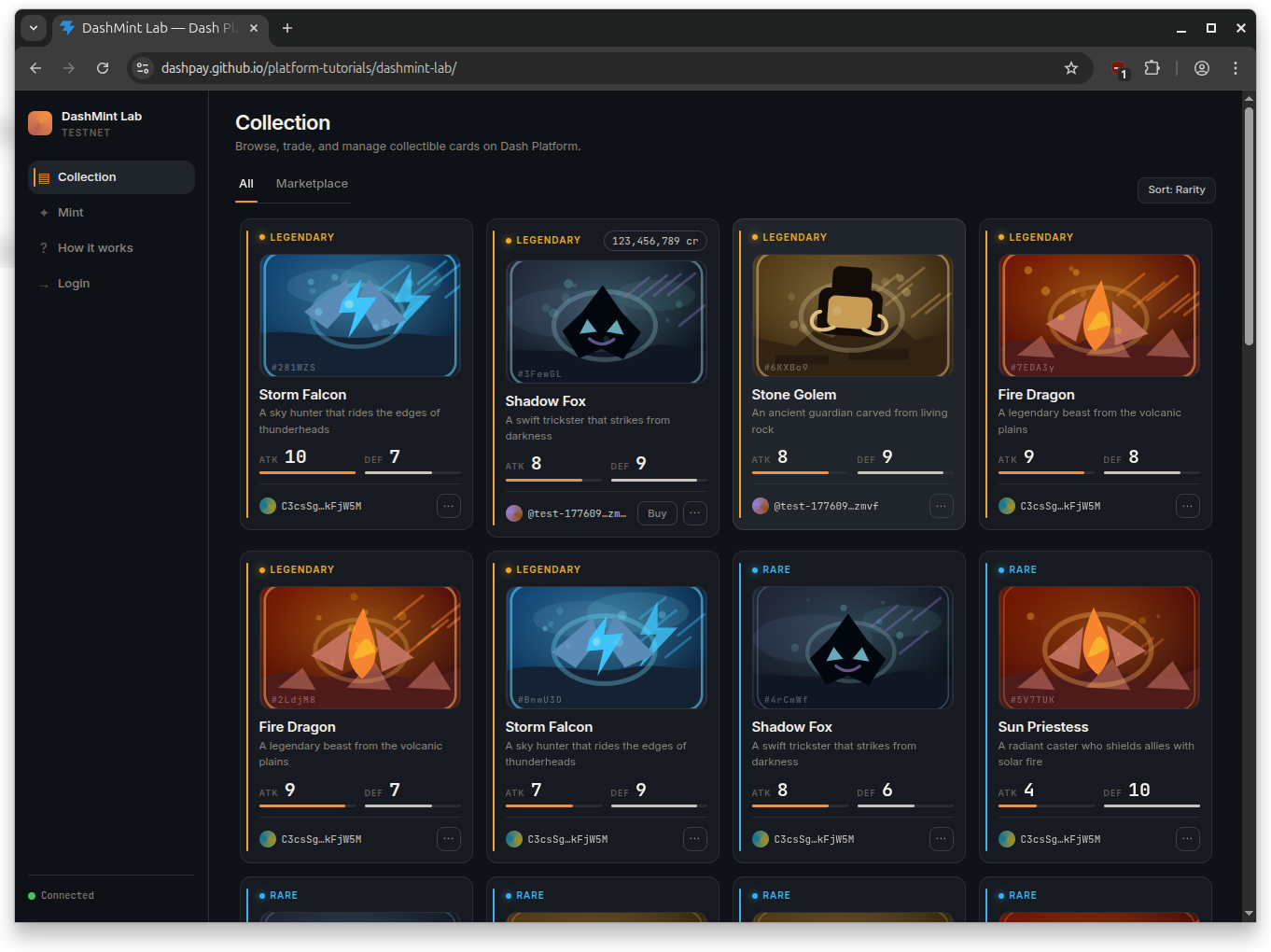
What this app does#
The app lets users log in with a BIP-39 mnemonic, mint “card” NFTs with random attack/defense stats by burning DashMint tokens, browse cards across the network, set sale prices, purchase cards from other identities, transfer cards or DashMint tokens as gifts, and burn cards they no longer want. Read-only browsing works without any credentials.
For background on Dash Platform NFT features such as transfer, trade, delete, and creation restrictions, see the NFT explanation.
How the code is structured#
Every Platform SDK call lives in its own file under src/dash/. The React UI is a thin layer on top that wires those functions to forms and buttons. Because the app is browser-based, it imports the same setupDashClient-core.mjs module already covered in Setup SDK Client, so the Node tutorials and this app share one source of truth for client creation and key derivation.
TL;DR#
Each NFT operation lives in its own
src/dash/*.tsfile.The easiest entry points are
src/dash/queries.ts,src/dash/contract.ts,src/dash/dashMintToken.ts, andsrc/dash/mintCard.ts.Minting costs 1 DashMint token. The contract burns that token through
card.tokenCost.create, so the fixed token supply caps the card supply.Most mutations share one helper:
src/dash/withAuthedCard.ts.The UI mostly passes form input into those functions and renders the results.
client.tsandkeyManager.tsare thin re-exports ofsetupDashClient-core.mjs.
If you just want the mental model: read the architecture table, then contract.ts, dashMintToken.ts, mintCard.ts, and whichever operation you care about.
Prerequisites#
General prerequisites (Node.js / Dash SDK installed)
A configured client: Setup SDK Client — DashMint re-uses
setupDashClient-core.mjsA registered identity: Register an Identity
Familiarity with data contracts: Register a Data Contract — particularly the NFT tab
Node >= 22 and a funded testnet identity (BIP-39 mnemonic + identity index)
DashMint tokens on the active contract if you want to mint on an existing contract. Registering a fresh contract starts it with 100 DashMint tokens owned by the registering identity.
(Optional) A second funded identity to test cross-profile transfer and purchase
Clone and run#
git clone https://github.com/dashpay/platform-tutorials.git
cd platform-tutorials/example-apps/dashmint-lab
npm install
npm run dev
The dev server runs on http://localhost:5173. Open it in a browser, click Login, and paste your testnet mnemonic. The app ships with a default contract ID so browse-only mode works on a fresh install. To mint, use an identity that already has DashMint tokens for the active contract, transfer tokens from another identity, or register a fresh contract from the login modal.
Production build: npm run build && npm run preview.
Architecture tour#
Every Platform SDK call lives in its own file under src/dash/:
Operation |
File |
SDK method |
|---|---|---|
Connect to testnet |
|
|
Derive identity keys |
|
|
Deploy card contract |
|
|
Query cards |
|
|
Token balance / supply |
|
|
Mint a card |
|
|
Transfer DashMint tokens |
|
|
Transfer a card |
|
|
Set / remove price |
|
|
Purchase a card |
|
|
Burn (delete) a card |
|
|
A few supporting files glue the operations together:
src/dash/withAuthedCard.ts— shared mutation prelude used by transfer, setPrice, purchase, and burn. Fetches the document, bumps its revision, and resolves the auth signer.src/dash/dashMintToken.ts— fixed-supply DashMint token constants,tokenPaymentInfo, token balance lookup, and minted-count calculation.src/dash/logger.ts— sharedLoggertype so every operation can stream progress to the UI activity log.
client.ts and keyManager.ts are just re-exports:
export { createClient } from '../../../../setupDashClient-core.mjs';
export { IdentityKeyManager } from '../../../../setupDashClient-core.mjs';
That means the connection and key-derivation behavior are the same as in the Node tutorials. Read Setup SDK Client for the full client setup details.
DashMint token flow#
DashMint Lab uses a token to make minting scarce without adding a separate minting service. The data contract defines token position 0 as a fixed-supply DashMint token with a supply of 100. The card document type charges 1 token on create and burns it, so every successful card mint reduces the remaining mint capacity.
The token helper file centralizes the constants, the tokenPaymentInfo passed to sdk.documents.create, and the read helpers used by the Mint and Tokens tabs.
/**
 * DashMint token constants and helpers.
 *
 * The data contract defines token position 0 as a fixed-supply DashMint token.
 * Creating a `card` document burns one token via `card.tokenCost.create`.
 * UI code uses this file to build tokenPaymentInfo and display the signed-in
 * identity's remaining DashMint token balance.
 */
import type { DashSdk } from "./types";

export const DASHMINT_TOKEN_POSITION = 0;
export const DASHMINT_TOKEN_COST = 1n;
export const DASHMINT_TOKEN_SUPPLY = 100n;
export const DASHMINT_TOKEN_NAME = "DashMint";
export const DASHMINT_TOKEN_PLURAL = "DashMint";

// Agreement passed to sdk.documents.create() to satisfy the contract's
// one-token burn requirement for card creation.
export const DASHMINT_TOKEN_PAYMENT_INFO = {
  tokenContractPosition: DASHMINT_TOKEN_POSITION,
  maximumTokenCost: DASHMINT_TOKEN_COST,
  gasFeesPaidBy: "documentOwner" as const,
};

export async function fetchDashMintTokenBalance({
  sdk,
  contractId,
  identityId,
}: {
  sdk: DashSdk;
  contractId: string;
  identityId: string;
}): Promise<bigint> {
  const tokenId = await sdk.tokens.calculateId(
    contractId,
    DASHMINT_TOKEN_POSITION,
  );
  const balances = await sdk.tokens.identityBalances(identityId, [tokenId]);
  return balances.get(tokenId) ?? 0n;
}

// Every mint burns exactly one DashMint token (manual burns/mints are locked
// in the contract), so cards minted = SUPPLY - current circulating supply.
export async function fetchCardsMintedCount({
  sdk,
  contractId,
}: {
  sdk: DashSdk;
  contractId: string;
}): Promise<bigint> {
  const tokenId = await sdk.tokens.calculateId(
    contractId,
    DASHMINT_TOKEN_POSITION,
  );
  const supply = await sdk.tokens.totalSupply(tokenId);
  const remaining = supply?.totalSupply ?? DASHMINT_TOKEN_SUPPLY;
  return DASHMINT_TOKEN_SUPPLY - remaining;
}
The Mint tab uses fetchDashMintTokenBalance() to disable minting when the signed-in identity has no DashMint tokens. It uses fetchCardsMintedCount() to show the supply meter, hide the mint form when all 100 cards have been minted, and disable the Starter Pack button when fewer than three mints remain.
Read path: queries first#
If you want to understand how data shows up in the UI, start with src/dash/queries.ts. The Collection tab has three sub-views, each backed by a different query: your own cards, every card on the contract, and only the cards that are currently for sale. normalizeCards() flattens the three possible shapes the SDK can return (array, Map, or plain object) into a single flat list the UI can render.
/**
 * Read queries over the card data contract.
 *
 * Three variants backing the Collection tab's sub-tabs:
 *   listMyCards — cards owned by the signed-in identity (uses where $ownerId)
 *   listAllCards — every card across the network (capped limit)
 *   listMarketplaceCards — every card that has a non-null $price
 *
 * normalizeCards() hides the three possible shapes the SDK may return
 * (Array, Map, or plain object) so UI code always sees a plain array of
 * { id, ownerId, data, $price }.
 *
 * SDK method: sdk.documents.query({ dataContractId, documentTypeName, where?, limit })
 */
import type { Logger } from "./logger.js";
import type {
  DashCardQueryDocument,
  DashCardQueryResults,
  DashSdk,
} from "./types";

// Platform caps document queries at 100 results per request.
const MAX_QUERY_LIMIT = 100;

export interface Card {
  id: string;
  ownerId: string;
  data: {
    name?: string;
    description?: string;
    attack?: number;
    defense?: number;
  };
  $price?: number | bigint;
}

function hasSalePrice(card: Card): boolean {
  return card.$price != null && card.$price !== 0 && card.$price !== 0n;
}

function toCard(id: string | null, raw: DashCardQueryDocument): Card {
  const j: Record<string, unknown> =
    typeof raw?.toJSON === "function" ? raw.toJSON() : raw;
  return {
    id: (id ?? (j.$id as string) ?? (j.id as string)) as string,
    ownerId: j.$ownerId as string,
    data: {
      name: j.name as string | undefined,
      description: j.description as string | undefined,
      attack: j.attack as number | undefined,
      defense: j.defense as number | undefined,
    },
    $price: j.$price as number | bigint | undefined,
  };
}

export function normalizeCards(results: DashCardQueryResults): Card[] {
  if (Array.isArray(results)) return results.map((d) => toCard(null, d));
  const entries =
    results instanceof Map ? Object.fromEntries(results) : results;
  return Object.entries(entries).map(([id, d]) => toCard(id, d));
}

interface BaseParams {
  sdk: DashSdk;
  contractId: string;
  limit?: number;
  log?: Logger;
}

export async function listMyCards({
  sdk,
  contractId,
  identityId,
  limit = MAX_QUERY_LIMIT,
  log,
}: BaseParams & { identityId: string }): Promise<Card[]> {
  log?.("Loading your cards…");
  const results = await sdk.documents.query({
    dataContractId: contractId,
    documentTypeName: "card",
    where: [["$ownerId", "==", identityId]],
    limit,
  });
  const cards = normalizeCards(results);
  log?.(`Found ${cards.length} card(s).`);
  return cards;
}

export async function listAllCards({
  sdk,
  contractId,
  limit = MAX_QUERY_LIMIT,
  log,
}: BaseParams): Promise<Card[]> {
  log?.("Loading all cards (any owner)…");
  const results = await sdk.documents.query({
    dataContractId: contractId,
    documentTypeName: "card",
    limit,
  });
  const cards = normalizeCards(results);
  log?.(`Found ${cards.length} card(s) total.`);
  return cards;
}

export async function listMarketplaceCards({
  sdk,
  contractId,
  limit = MAX_QUERY_LIMIT,
  log,
}: BaseParams): Promise<Card[]> {
  log?.("Loading marketplace…");
  const results = await sdk.documents.query({
    dataContractId: contractId,
    documentTypeName: "card",
    limit,
  });
  const cards = normalizeCards(results).filter(hasSalePrice);
  log?.(`Found ${cards.length} card(s) for sale.`);
  return cards;
}
Operation walkthrough#
Each operation file is intentionally small. The app-level pattern is: validate input, prepare a Document or reuse withAuthedCard(), call one SDK method, then log the result.
Mint a card#
Minting builds a Document with the card properties and owner, then calls sdk.documents.create. There is no existing document to fetch and no revision to bump. The card document type has tokenCost.create configured, so the call also passes tokenPaymentInfo to burn one DashMint token. That token burn is what enforces the fixed card supply.
The UI exposes this in two ways: a single-card form that burns 1 token, and a Starter Pack button that calls mintCard() repeatedly for multiple predefined cards. Both paths use the same SDK helper, so each card still costs 1 DashMint token and each successful create burns one token.
/**
 * Mint a new card (create a document against the card data contract).
 *
 * Attack and defense are rolled client-side (1-10 each). Name is required,
 * description is optional.
 *
 * Scarcity comes from the contract, not this function: the `card` document
 * type has `tokenCost.create` configured to burn 1 token at position 0.
 * Passing `tokenPaymentInfo` below is the caller's agreement to spend that
 * DashMint token, so each successful document create consumes one fixed-supply
 * token and reduces the remaining mint capacity.
 *
 * SDK method: sdk.documents.create({ document, identityKey, signer, tokenPaymentInfo })
 */
import { Document } from "@dashevo/evo-sdk";

import type { Logger } from "./logger";
import { DASHMINT_TOKEN_PAYMENT_INFO } from "./dashMintToken";
import type { DashKeyManager, DashSdk } from "./types";

export interface MintCardInput {
  name: string;
  description?: string;
  /** Override for deterministic tests. Default: random 1-10. */
  attack?: number;
  /** Override for deterministic tests. Default: random 1-10. */
  defense?: number;
}

export interface MintCardParams {
  sdk: DashSdk;
  keyManager: DashKeyManager;
  contractId: string;
  card: MintCardInput;
  log?: Logger;
}

function rollStat(): number {
  return Math.floor(Math.random() * 10) + 1;
}

export async function mintCard({
  sdk,
  keyManager,
  contractId,
  card,
  log,
}: MintCardParams): Promise<void> {
  const name = card.name.trim();
  if (!name) throw new Error("Card name is required.");

  const attack = card.attack ?? rollStat();
  const defense = card.defense ?? rollStat();
  const description = card.description?.trim();

  log?.(
    `Burning 1 DashMint token to mint "${name}" (ATK ${attack} / DEF ${defense})…`,
  );

  const { identity, identityKey, signer } = await keyManager.getAuth();

  const properties: Record<string, unknown> = { name, attack, defense };
  if (description) properties.description = description;

  const doc = new Document({
    properties,
    documentTypeName: "card",
    dataContractId: contractId,
    ownerId: identity.id,
  });

  await sdk.documents.create({
    document: doc,
    identityKey,
    signer,
    tokenPaymentInfo: DASHMINT_TOKEN_PAYMENT_INFO,
  });
  log?.(`Card "${name}" minted!`, "success");
}
Transfer a card#
Transfer hands ownership of an existing card to another identity without a price. The interesting work happens inside withAuthedCard(); this file just calls sdk.documents.transfer on the prepared document.
/**
 * Transfer a card (NFT document) to another identity.
 *
 * Gotcha (see tutorial/nft/CLAUDE.md): transfer uses the AUTHENTICATION
 * key, not the TRANSFER purpose key. The Platform rejects TRANSFER-purpose
 * keys for document state transitions.
 *
 * SDK method: sdk.documents.transfer({ document, recipientId, identityKey, signer })
 */
import type { Logger } from "./logger";
import type { DashKeyManager, DashSdk } from "./types";
import { withAuthedCard } from "./withAuthedCard";

export interface TransferCardParams {
  sdk: DashSdk;
  keyManager: DashKeyManager;
  contractId: string;
  cardId: string;
  recipientId: string;
  log?: Logger;
}

export async function transferCard({
  sdk,
  keyManager,
  contractId,
  cardId,
  recipientId,
  log,
}: TransferCardParams): Promise<void> {
  if (!recipientId) throw new Error("Recipient identity ID is required.");
  log?.(`Transferring card ${cardId} to ${recipientId}…`);

  await withAuthedCard(
    { sdk, keyManager, contractId, cardId, errorLabel: "Transfer error", log },
    async ({ doc, identityKey, signer }) => {
      await sdk.documents.transfer({
        document: doc,
        recipientId,
        identityKey,
        signer,
      });
      log?.("Card transferred!", "success");
    },
  );
}
Set or remove a sale price#
Pricing a card adds a $price field to its document on-chain. That’s what the Marketplace tab filters by. Passing price = 0n removes the card from sale.
/**
 * Set (or remove) the sale price on a card.
 *
 * Pricing a card adds a `$price` field to the document on-chain, which is
 * what the Marketplace tab filters by. Passing price = 0n removes the
 * card from sale.
 *
 * SDK method: sdk.documents.setPrice({ document, price, identityKey, signer })
 */
import type { Logger } from "./logger";
import type { DashKeyManager, DashSdk } from "./types";
import { withAuthedCard } from "./withAuthedCard";

export interface SetPriceParams {
  sdk: DashSdk;
  keyManager: DashKeyManager;
  contractId: string;
  cardId: string;
  /** Price in credits. Pass 0 to remove the card from sale. */
  price: number | bigint;
  log?: Logger;
}

export async function setPrice({
  sdk,
  keyManager,
  contractId,
  cardId,
  price,
  log,
}: SetPriceParams): Promise<void> {
  const priceBig = typeof price === "bigint" ? price : BigInt(price);
  const removing = priceBig === 0n;

  log?.(
    removing
      ? `Removing price from card ${cardId}…`
      : `Setting price ${priceBig} credits on card ${cardId}…`,
  );

  await withAuthedCard(
    {
      sdk,
      keyManager,
      contractId,
      cardId,
      errorLabel: removing ? "Remove price error" : "Set price error",
      log,
    },
    async ({ doc, identityKey, signer }) => {
      await sdk.documents.setPrice({
        document: doc,
        price: priceBig,
        identityKey,
        signer,
      });
      log?.(removing ? "Card removed from sale." : "Price set!", "success");
    },
  );
}
Purchase a card#
The buying identity pays price credits and becomes the new owner in a single state transition. Platform enforces the price server-side — passing a stale price fails the transition.
/**
 * Purchase a priced card from another identity.
 *
 * The signed-in identity pays `price` credits and becomes the new owner.
 * Platform enforces the price server-side — passing a stale price fails.
 *
 * SDK method: sdk.documents.purchase({ document, buyerId, price, identityKey, signer })
 */
import type { Logger } from "./logger";
import type { DashKeyManager, DashSdk } from "./types";
import { withAuthedCard } from "./withAuthedCard";

export interface PurchaseCardParams {
  sdk: DashSdk;
  keyManager: DashKeyManager;
  contractId: string;
  cardId: string;
  /** Price in credits — must match the on-chain $price. */
  price: number | bigint;
  log?: Logger;
}

export async function purchaseCard({
  sdk,
  keyManager,
  contractId,
  cardId,
  price,
  log,
}: PurchaseCardParams): Promise<void> {
  const priceBig = typeof price === "bigint" ? price : BigInt(price);
  log?.(`Purchasing card ${cardId} for ${priceBig} credits…`);

  await withAuthedCard(
    {
      sdk,
      keyManager,
      contractId,
      cardId,
      errorLabel: "Purchase error",
      log,
    },
    async ({ doc, identity, identityKey, signer }) => {
      await sdk.documents.purchase({
        document: doc,
        buyerId: identity.id,
        price: priceBig,
        identityKey,
        signer,
      });
      log?.("Card purchased!", "success");
    },
  );
}
Burn a card#
Burn permanently deletes the document from Platform. Unlike the other mutations, delete only needs identifying fields — no full fetched document, no revision bump. That’s why withAuthedCard is called with preFetch: false.
/**
 * Burn a card — permanently delete the document from the Platform.
 *
 * Unlike the other mutations, burn does NOT need the full fetched Document:
 * the delete API only needs enough identifying fields to locate the target.
 * That's why withAuthedCard() is called with preFetch: false.
 *
 * SDK method: sdk.documents.delete({ document, identityKey, signer })
 */
import type { Logger } from "./logger";
import type { DashKeyManager, DashSdk } from "./types";
import { withAuthedCard } from "./withAuthedCard";

export interface BurnCardParams {
  sdk: DashSdk;
  keyManager: DashKeyManager;
  contractId: string;
  cardId: string;
  log?: Logger;
}

export async function burnCard({
  sdk,
  keyManager,
  contractId,
  cardId,
  log,
}: BurnCardParams): Promise<void> {
  log?.(`Burning card ${cardId}…`);

  await withAuthedCard(
    {
      sdk,
      keyManager,
      contractId,
      cardId,
      preFetch: false,
      errorLabel: "Burn error",
      log,
    },
    async ({ identity, identityKey, signer }) => {
      await sdk.documents.delete({
        document: {
          id: cardId,
          ownerId: identity.id,
          dataContractId: contractId,
          documentTypeName: "card",
        },
        identityKey,
        signer,
      });
      log?.("Card burned.", "success");
    },
  );
}
Transfer DashMint tokens#
DashMint tokens are ordinary Platform tokens on the active app contract. The Tokens tab lets a signed-in identity send whole DashMint token amounts to another identity, which is useful for testing scarcity across multiple profiles. Unlike card document operations, explicit token sends use the transfer key returned by keyManager.getTransfer().
/**
 * Transfer DashMint tokens from the signed-in identity to another identity.
 *
 * DashMint lives at token position 0 on the active app contract. Token
 * single-transfer transitions can be signed by a critical auth or transfer
 * purpose key; this app keeps explicit token sends on the transfer key.
 *
 * SDK method: sdk.tokens.transfer({ dataContractId, tokenPosition, amount, senderId, recipientId, identityKey, signer })
 */
import { DASHMINT_TOKEN_NAME, DASHMINT_TOKEN_POSITION } from "./dashMintToken";
import type { Logger } from "./logger";
import type { DashKeyManager, DashSdk } from "./types";

export interface TransferDashMintTokensInput {
  sdk: DashSdk;
  keyManager: DashKeyManager;
  contractId: string;
  recipientId: string;
  amount: bigint;
  log?: Logger;
}

export async function transferDashMintTokens({
  sdk,
  keyManager,
  contractId,
  recipientId,
  amount,
  log,
}: TransferDashMintTokensInput): Promise<void> {
  const trimmedRecipientId = recipientId.trim();
  if (!trimmedRecipientId) {
    throw new Error("Recipient identity ID is required.");
  }
  if (amount <= 0n) {
    throw new Error("Amount must be greater than 0.");
  }

  const knownSenderId = keyManager.identityId?.toString();
  if (knownSenderId && trimmedRecipientId === knownSenderId) {
    throw new Error("Cannot transfer tokens to yourself.");
  }

  const { identity, identityKey, signer } = await keyManager.getTransfer();
  const senderId = identity.id.toString();
  if (trimmedRecipientId === senderId) {
    throw new Error("Cannot transfer tokens to yourself.");
  }

  log?.(
    `Transferring ${amount.toString()} ${DASHMINT_TOKEN_NAME} token${
      amount === 1n ? "" : "s"
    }...`,
  );

  await sdk.tokens.transfer({
    dataContractId: contractId,
    tokenPosition: DASHMINT_TOKEN_POSITION,
    amount,
    senderId,
    recipientId: trimmedRecipientId,
    identityKey,
    signer,
  });

  log?.(`${DASHMINT_TOKEN_NAME} tokens transferred.`, "success");
}
Contract schema#
What makes this an NFT contract#
The card data contract defines one document type (card) with four fields and three indices. Three top-level settings control its NFT behavior: transferable: 1 lets owners send cards to other identities, tradeMode: 1 enables the built-in price/purchase flow, and creationRestrictionMode: 0 leaves creation open. Scarcity comes from tokenCost.create, so any identity can mint when it can pay and burn 1 DashMint token. See the NFT explanation for what each flag does, and the NFT tab in Register a Data Contract for the schema in JSON form.
How the app registers or reuses the contract#
ensureContract() reuses a previously published contract ID from localStorage when one is present, and only calls sdk.contracts.publish on first run. That keeps the app usable without forcing every visitor to publish their own contract.
/**
 * NFT card data contract schema + registerContract / ensureContract.
 *
 * WHAT: A Dash Platform "data contract" defines the schema for documents.
 * This one describes a single document type (`card`) with four fields
 * (name, description, attack, defense) plus three indices so the app can
 * query by owner, attack, or defense.
 *
 * The three flags at the top of the schema are what make this an NFT:
 *   transferable: 1         — documents can be sent to another identity (0 to disable)
 *   tradeMode: 1            — documents can be priced and purchased (0 to disable)
 *   creationRestrictionMode: 0 — anyone can create when they can pay tokenCost.create
 *
 * tokenCost.create burns 1 DashMint token, turning the fixed token
 * supply into the maximum number of cards that can ever be minted.
 *
 * Storage helpers (loadStoredContractId, saveContractId, …) and the owner
 * lookup live in contractStorage.ts so they can be imported without
 * pulling the @dashevo/evo-sdk runtime into the entry bundle.
 *
 * SDK methods: new DataContract({ ... }), sdk.contracts.publish(...)
 */
import {
  AuthorizedActionTakers,
  ChangeControlRules,
  DataContract,
  TokenConfiguration,
  TokenConfigurationConvention,
  TokenConfigurationLocalization,
  TokenDistributionRules,
  TokenKeepsHistoryRules,
  TokenMarketplaceRules,
  TokenTradeMode,
} from "@dashevo/evo-sdk";

import { loadStoredContractId, saveContractId } from "./contractStorage";
import type { Logger } from "./logger";
import {
  DASHMINT_TOKEN_NAME,
  DASHMINT_TOKEN_PLURAL,
  DASHMINT_TOKEN_POSITION,
  DASHMINT_TOKEN_SUPPLY,
} from "./dashMintToken";
import type { DashKeyManager, DashSdk } from "./types";

export {
  DEFAULT_CONTRACT_ID,
  clearStoredContractId,
  fetchContractOwnerId,
  loadStoredContractId,
  saveContractId,
} from "./contractStorage";

export const CARD_SCHEMAS = {
  card: {
    type: "object",
    documentsMutable: false,
    canBeDeleted: true,
    transferable: 1,
    tradeMode: 1,
    creationRestrictionMode: 0,
    tokenCost: {
      create: {
        tokenPosition: DASHMINT_TOKEN_POSITION,
        amount: 1,
        effect: 1,
        gasFeesPaidBy: 0,
      },
    },
    properties: {
      name: {
        type: "string",
        description: "Name of the card",
        minLength: 1,
        maxLength: 63,
        position: 0,
      },
      description: {
        type: "string",
        description: "Description of the card",
        minLength: 0,
        maxLength: 256,
        position: 1,
      },
      attack: {
        type: "integer",
        description: "Attack power",
        position: 2,
      },
      defense: {
        type: "integer",
        description: "Defense level",
        position: 3,
      },
    },
    indices: [
      { name: "owner", properties: [{ $ownerId: "asc" }] },
      { name: "attack", properties: [{ attack: "asc" }] },
      { name: "defense", properties: [{ defense: "asc" }] },
    ],
    required: ["name", "attack", "defense"],
    additionalProperties: false,
  },
} as const;

export function createDashMintTokenConfiguration(ownerId: string) {
  const contractOwner = AuthorizedActionTakers.ContractOwner();
  const noOne = AuthorizedActionTakers.NoOne();

  const ownerRules = new ChangeControlRules({
    authorizedToMakeChange: contractOwner,
    adminActionTakers: contractOwner,
    isChangingAuthorizedActionTakersToNoOneAllowed: true,
    isChangingAdminActionTakersToNoOneAllowed: true,
    isSelfChangingAdminActionTakersAllowed: true,
  });
  const lockedRules = new ChangeControlRules({
    authorizedToMakeChange: noOne,
    adminActionTakers: noOne,
  });

  return new TokenConfiguration({
    conventions: new TokenConfigurationConvention(
      {
        en: new TokenConfigurationLocalization(
          false,
          DASHMINT_TOKEN_NAME,
          DASHMINT_TOKEN_PLURAL,
        ),
      },
      0,
    ),
    conventionsChangeRules: ownerRules,
    baseSupply: DASHMINT_TOKEN_SUPPLY,
    maxSupply: DASHMINT_TOKEN_SUPPLY,
    keepsHistory: new TokenKeepsHistoryRules({
      isKeepingBurningHistory: true,
      isKeepingTransferHistory: true,
    }),
    maxSupplyChangeRules: lockedRules,
    distributionRules: new TokenDistributionRules({
      newTokensDestinationIdentity: ownerId,
      newTokensDestinationIdentityRules: ownerRules,
      mintingAllowChoosingDestination: false,
      mintingAllowChoosingDestinationRules: ownerRules,
      perpetualDistributionRules: lockedRules,
      changeDirectPurchasePricingRules: lockedRules,
    }),
    marketplaceRules: new TokenMarketplaceRules(
      TokenTradeMode.NotTradeable(),
      lockedRules,
    ),
    manualMintingRules: lockedRules,
    manualBurningRules: lockedRules,
    freezeRules: lockedRules,
    unfreezeRules: lockedRules,
    destroyFrozenFundsRules: lockedRules,
    emergencyActionRules: lockedRules,
    mainControlGroupCanBeModified: noOne,
    description: "Fixed-supply DashMint token burned to mint demo cards.",
  });
}

/**
 * Register a fresh NFT card data contract on Platform and persist its ID.
 *
 * SDK methods: sdk.identities.nonce(...), sdk.contracts.publish(...).
 */
export async function registerContract({
  sdk,
  keyManager,
  log,
}: {
  sdk: DashSdk;
  keyManager: DashKeyManager;
  log?: Logger;
}): Promise<string> {
  log?.("Registering NFT card contract…");
  const { identity, identityKey, signer } = await keyManager.getAuth();
  const identityNonce = await sdk.identities.nonce(identity.id.toString());
  const dataContract = new DataContract({
    ownerId: identity.id,
    identityNonce: (identityNonce || 0n) + 1n,
    schemas: CARD_SCHEMAS,
    tokens: {
      [DASHMINT_TOKEN_POSITION]: createDashMintTokenConfiguration(
        identity.id.toString(),
      ),
    },
    fullValidation: true,
  });

  log?.("Publishing contract…");
  const published = await sdk.contracts.publish({
    dataContract,
    identityKey,
    signer,
  });
  const contractId = published.id?.toString() || published.toJSON?.()?.id;

  if (!contractId) {
    throw new Error(
      `Contract publish returned no id: ${JSON.stringify(published.toJSON?.() ?? published)}`,
    );
  }

  saveContractId(contractId);
  log?.(`Contract registered: ${contractId}`, "success");
  return contractId;
}

/**
 * Ensure a card data contract exists for this app. If a contract ID is
 * already persisted in localStorage (or passed in), we reuse it. Otherwise
 * publish a fresh contract owned by the signed-in identity and persist its
 * ID for next time.
 */
export async function ensureContract({
  sdk,
  keyManager,
  existingId,
  log,
}: {
  sdk: DashSdk;
  keyManager: DashKeyManager;
  existingId?: string | null;
  log?: Logger;
}): Promise<string> {
  const fromStorage = existingId ?? loadStoredContractId();
  if (fromStorage) {
    log?.(`Using saved contract ID: ${fromStorage}`);
    return fromStorage;
  }
  return registerContract({ sdk, keyManager, log });
}
Next steps#
Read more about NFT features in the NFT explanation.
Try the same operations headlessly from Node using the tutorials in Contracts and documents.
Fork the app and adapt the contract schema to your own NFT use case. The one-file-per-operation layout under
src/dash/makes it easy to swap a single operation without touching the rest.