
Dashnote#
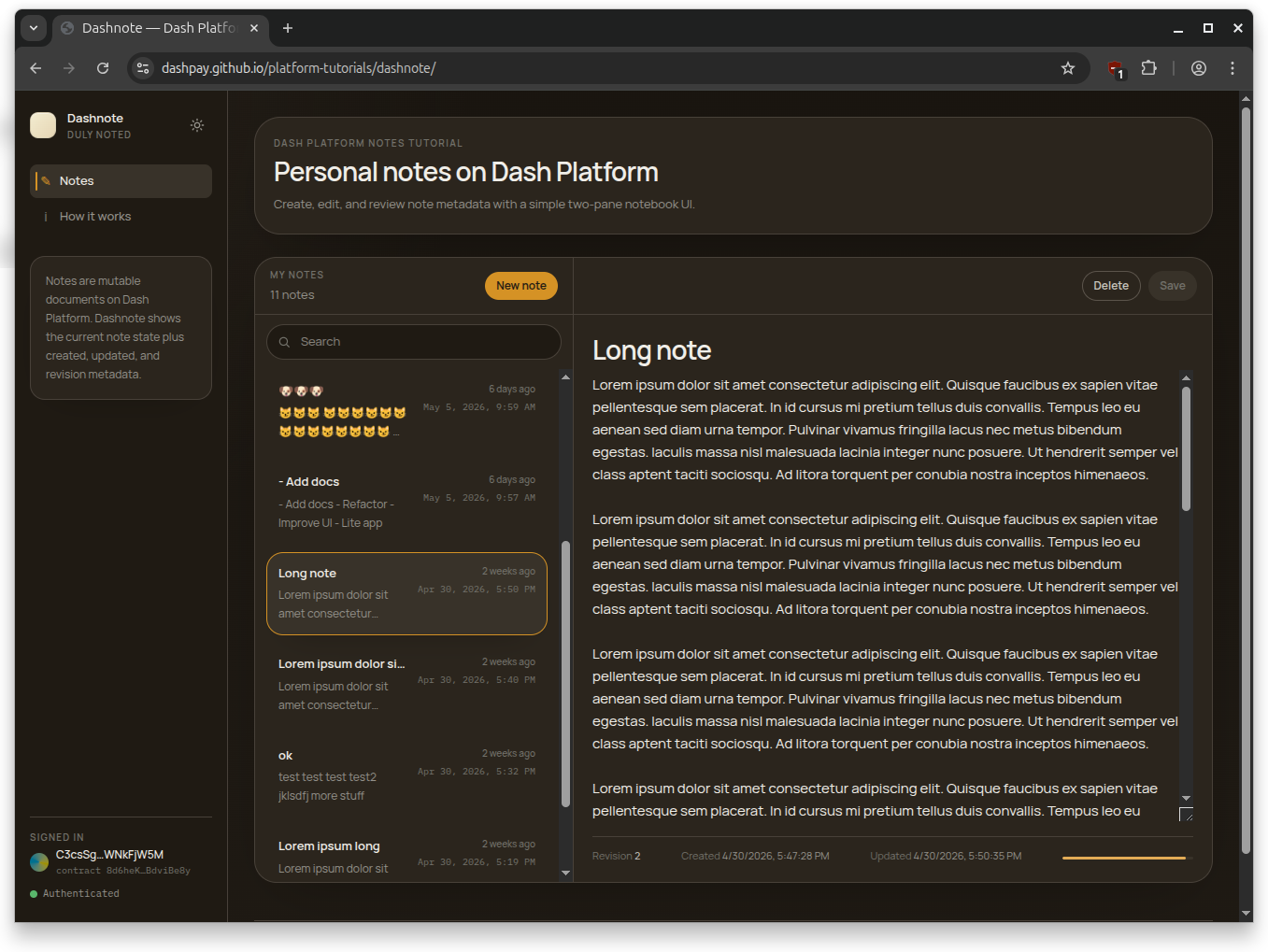
Dashnote is a React + TypeScript + Vite single-page app that demonstrates full mutable-document CRUD on Dash Platform. Users log in with a BIP-39 mnemonic, create notes with an optional title and required message body, edit and delete their own notes, and browse any identity’s notes in read-only mode without credentials.
Where DashMint Lab covers the NFT-shaped operations (mint, transfer, price, purchase, burn), Dashnote covers the everyday document lifecycle: create, query, update, delete — plus the fetch-then-bump-revision pattern that every Platform document update has to follow.
What this app does#
The app ships with a bundled note contract so the read path works on a fresh install without registering anything. After login, users can create notes (optional title, required message), edit them in place, and delete them. The editor reports field length in UTF-8 bytes rather than characters, because that’s what Platform’s maxLength constraint actually checks. A localStorage-backed cache paints the recent-notes list instantly on reload while a background query revalidates against the network.
For background on data contracts and document state transitions, see Submit documents, Update documents, and Delete documents.
How the code is structured#
Every Platform SDK call lives in its own file under src/dash/. The React UI is a thin layer on top that wires those functions to forms and buttons. Like DashMint, Dashnote imports the same setupDashClient-core.mjs module covered in Setup SDK Client, so the Node tutorials and this app share one source of truth for client creation and key derivation.
TL;DR#
Each note operation lives in its own
src/dash/*.tsfile.The easiest entry points are
src/dash/queries.ts,src/dash/createNote.ts, andsrc/dash/updateNote.ts.The central pattern is fetch → bump revision → replace in
updateNote.ts.client.tsandkeyManager.tsare thin re-exports ofsetupDashClient-core.mjs.
If you just want the mental model: read the architecture table, then createNote.ts, then updateNote.ts to see how revision bumping works.
Prerequisites#
General prerequisites (Node.js / Dash SDK installed)
A configured client: Setup SDK Client — Dashnote re-uses
setupDashClient-core.mjsA registered identity: Register an Identity
Familiarity with data contracts: Register a Data Contract
Node >= 22 and a funded testnet identity (BIP-39 mnemonic + identity index) for write operations
Read-only browse works without any credentials against the bundled default contract
Clone and run#
git clone https://github.com/dashpay/platform-tutorials.git
cd platform-tutorials/example-apps/dashnote
npm install
npm run dev
The dev server runs on http://localhost:5173. Open it in a browser to browse notes in read-only mode immediately, or click Login and paste your testnet mnemonic to start creating and editing notes.
Production build: npm run build && npm run preview.
Architecture tour#
Every Platform SDK call lives in its own file under src/dash/:
Operation |
File |
SDK method |
|---|---|---|
Connect to testnet |
|
|
Derive identity keys |
|
|
Register note contract |
|
|
Create a note |
|
|
Update a note |
|
|
Delete a note |
|
|
List notes |
|
|
Get one note |
|
|
Three supporting files glue the operations together:
src/dash/types.ts— shared SDK types (DashSdk,DashKeyManager, query result shapes) wired through every dash helper.src/lib/logger.ts—Loggerfunction type pluserrorMessage(err). Plumbed through every dash call so progress streams to the activity log;level: "success" | "error"raises sonner toasts.src/lib/notesCache.ts— localStorage-backed note list keyed byidentityId + contractId + network. Powers optimistic paint on reload before background revalidation completes.
client.ts and keyManager.ts are just re-exports:
export { createClient } from '../../../../setupDashClient-core.mjs';
export { IdentityKeyManager } from '../../../../setupDashClient-core.mjs';
That means the connection and key-derivation behavior are the same as in the Node tutorials. Read Setup SDK Client for the full client setup details.
The update pattern#
Every update on an existing Platform document follows the same three steps:
Fetch the current on-chain document so you can read its revision.
Set
revision = BigInt(existing.revision ?? 0) + 1n. Platform rejects state transitions that don’t strictly increase the revision.Call
sdk.documents.replacewith the new document body and the bumped revision.
This is why every Platform UI that lets users edit content needs to fetch before writing — there is no blind update. Dashnote’s updateNote.ts is the canonical example, walked through in Update a note below.
Read path: queries first#
If you want to understand how data shows up in the UI, start with src/dash/queries.ts. The recent-notes list uses sdk.documents.query with the byOwnerUpdated index, then sorts the results client-side by $updatedAt descending so the most recently edited note appears first. normalizeNotes() flattens the three possible shapes the SDK can return (array, Map, or plain object) into a flat list of NoteRecord values the UI can render.
getNote() is the single-document fetch used by the editor pane and by Dashnote Lite’s “Get by ID” tab.
/**
 * Read-side queries against the note contract.
 *
 * SDK methods:
 *   sdk.documents.query({ dataContractId, documentTypeName, where, orderBy, limit })
 *   sdk.documents.get(contractId, documentTypeName, documentId)
 */
import type { Logger } from "../lib/logger";
import type {
  DashDocumentLike,
  DashNoteQueryDocument,
  DashNoteQueryJson,
  DashNoteQueryResults,
  DashSdk,
} from "./types";

const MAX_QUERY_LIMIT = 100;

export interface NoteRecord {
  id: string;
  ownerId: string;
  title: string | null;
  message: string;
  createdAt: number | null;
  updatedAt: number | null;
  revision: number;
}

function toTimestamp(
  value: DashNoteQueryJson["$createdAt"] | DashNoteQueryJson["$updatedAt"],
): number | null {
  if (typeof value === "number" && Number.isFinite(value)) return value;
  if (typeof value === "bigint") return Number(value);
  if (typeof value === "string" && value) {
    const parsed = Number(value);
    return Number.isFinite(parsed) ? parsed : null;
  }
  return null;
}

function toRevision(
  value: number | string | bigint | undefined,
  fallback?: number | string | bigint,
): number {
  const raw = value ?? fallback;
  if (typeof raw === "number" && Number.isFinite(raw)) return raw;
  if (typeof raw === "bigint") return Number(raw);
  if (typeof raw === "string" && raw) {
    const parsed = Number(raw);
    return Number.isFinite(parsed) ? parsed : 0;
  }
  return 0;
}

function toNote(id: string | null, raw: DashNoteQueryDocument): NoteRecord {
  const json: DashNoteQueryJson =
    typeof raw?.toJSON === "function" ? raw.toJSON() : raw;
  return {
    id: String(id ?? json.$id ?? json.id ?? ""),
    ownerId: String(json.$ownerId ?? ""),
    title: typeof json.title === "string" ? json.title : null,
    message: typeof json.message === "string" ? json.message : "",
    createdAt: toTimestamp(json.$createdAt),
    updatedAt: toTimestamp(json.$updatedAt),
    revision: toRevision(json.$revision, raw.revision),
  };
}

export function normalizeNotes(results: DashNoteQueryResults): NoteRecord[] {
  if (Array.isArray(results)) {
    return results
      .filter(Boolean)
      .map((doc) => toNote(null, doc as DashNoteQueryDocument));
  }
  const entries =
    results instanceof Map ? Object.fromEntries(results) : results;
  return Object.entries(entries)
    .filter(([, doc]) => Boolean(doc))
    .map(([id, doc]) => toNote(id, doc as DashNoteQueryDocument));
}

export function normalizeSingleNote(
  id: string,
  raw: DashDocumentLike | undefined,
): NoteRecord | null {
  if (!raw) return null;
  return toNote(id, raw as DashNoteQueryDocument);
}

export async function listMyNotes({
  sdk,
  contractId,
  ownerId,
  limit = MAX_QUERY_LIMIT,
  log,
}: {
  sdk: DashSdk;
  contractId: string;
  ownerId: string;
  limit?: number;
  log?: Logger;
}): Promise<NoteRecord[]> {
  log?.("Loading your notes…");
  const results = await sdk.documents.query({
    dataContractId: contractId,
    documentTypeName: "note",
    where: [["$ownerId", "==", ownerId]],
    orderBy: [
      ["$ownerId", "asc"],
      ["$updatedAt", "asc"],
    ],
    limit,
  });

  return normalizeNotes(results).sort(
    (left, right) => (right.updatedAt ?? 0) - (left.updatedAt ?? 0),
  );
}

export async function getNote({
  sdk,
  contractId,
  noteId,
  log,
}: {
  sdk: DashSdk;
  contractId: string;
  noteId: string;
  log?: Logger;
}): Promise<NoteRecord | null> {
  log?.(`Loading note ${noteId}…`);
  const result = await sdk.documents.get(contractId, "note", noteId);
  return normalizeSingleNote(noteId, result);
}
Operation walkthrough#
Each operation file is intentionally small. The app-level pattern is: validate input, build a Document (and fetch the existing one when updating), call one SDK method, then log the result.
Create a note#
createNote.ts is the simplest write in the app: build a new Document, hand it to sdk.documents.create, and pull the new note’s ID off the returned document. The contract requires message; title is optional and only included when non-empty after trimming.
/**
 * Create a new note document.
 *
 * SDK method: sdk.documents.create({ document, identityKey, signer })
 */
import type { Logger } from "../lib/logger";
import { loadSdkModule } from "./sdkModule";
import type { DashKeyManager, DashSdk } from "./types";

export interface CreateNoteParams {
  sdk: DashSdk;
  keyManager: DashKeyManager;
  contractId: string;
  title?: string;
  message: string;
  log?: Logger;
}

export async function createNote({
  sdk,
  keyManager,
  contractId,
  title,
  message,
  log,
}: CreateNoteParams): Promise<string> {
  log?.("Creating note…");
  const { identity, identityKey, signer } = await keyManager.getAuth();
  const { Document } = await loadSdkModule();
  const trimmedTitle = title?.trim();
  const document = new Document({
    properties: {
      ...(trimmedTitle ? { title: trimmedTitle } : {}),
      message,
    },
    documentTypeName: "note",
    dataContractId: contractId,
    ownerId: identity.id,
  });

  await sdk.documents.create({
    document,
    identityKey,
    signer,
  });

  const json =
    typeof document.toJSON === "function"
      ? (document.toJSON(sdk.version()) as Record<string, unknown>)
      : {};
  const noteId = String(json.$id ?? json.id ?? "");
  if (!noteId) {
    throw new Error("Created note returned no ID.");
  }
  log?.("Note created.", "success");
  return noteId;
}
Update a note#
updateNote.ts is the canonical fetch-then-bump-revision write:
Call
sdk.documents.getto read the current on-chain revision.Increment it by one and build a new
Documentwith the same id and ownerId.Submit via
sdk.documents.replace. Replays without bumping the revision are rejected by the state transition.
The optional expectedRevision parameter guards against a concurrent edit: if the on-chain revision no longer matches what the caller last loaded, the update is refused with a “reload and try again” error instead of silently overwriting the newer version.
/**
 * Update an existing note. Fetches the current document to bump its revision,
 * then submits a replace state transition.
 *
 * Pass `expectedRevision` to refuse the update if the network's revision
 * doesn't match — i.e. the note was changed on the network after the local
 * copy was loaded.
 *
 * SDK methods:
 *   sdk.documents.get(contractId, documentTypeName, documentId)
 *   sdk.documents.replace({ document, identityKey, signer })
 */
import type { Logger } from "../lib/logger";
import { loadSdkModule } from "./sdkModule";
import type { DashKeyManager, DashSdk } from "./types";

export interface UpdateNoteParams {
  sdk: DashSdk;
  keyManager: DashKeyManager;
  contractId: string;
  noteId: string;
  title?: string;
  message: string;
  expectedRevision?: number;
  log?: Logger;
}

export async function updateNote({
  sdk,
  keyManager,
  contractId,
  noteId,
  title,
  message,
  expectedRevision,
  log,
}: UpdateNoteParams): Promise<bigint> {
  log?.(`Saving note ${noteId}…`);
  const { identity, identityKey, signer } = await keyManager.getAuth();
  const existingDoc = await sdk.documents.get(contractId, "note", noteId);
  if (!existingDoc) {
    throw new Error(`Note ${noteId} not found.`);
  }

  const currentRevision = BigInt(existingDoc.revision ?? 0);
  if (
    expectedRevision !== undefined &&
    currentRevision !== BigInt(expectedRevision)
  ) {
    throw new Error(
      `Note changed on network (you had revision ${expectedRevision}, network is at ${currentRevision}). Reload your notes and try again.`,
    );
  }

  const { Document } = await loadSdkModule();
  const revision = currentRevision + 1n;
  const trimmedTitle = title?.trim();
  const document = new Document({
    properties: {
      ...(trimmedTitle ? { title: trimmedTitle } : {}),
      message,
    },
    documentTypeName: "note",
    dataContractId: contractId,
    ownerId: identity.id,
    revision,
    id: noteId,
  });

  await sdk.documents.replace({
    document,
    identityKey,
    signer,
  });
  log?.("Note saved.", "success");
  return revision;
}
Delete a note#
deleteNote.ts is the inverse of create — no fetch needed. sdk.documents.delete only needs enough identifying fields (id, ownerId, dataContractId, documentTypeName), not a full document, so we can skip the round-trip.
/**
 * Delete a note document.
 *
 * SDK method: sdk.documents.delete({ document, identityKey, signer })
 */
import type { Logger } from "../lib/logger";
import type { DashKeyManager, DashSdk } from "./types";

export interface DeleteNoteParams {
  sdk: DashSdk;
  keyManager: DashKeyManager;
  contractId: string;
  noteId: string;
  log?: Logger;
}

export async function deleteNote({
  sdk,
  keyManager,
  contractId,
  noteId,
  log,
}: DeleteNoteParams): Promise<void> {
  log?.(`Deleting note ${noteId}…`);
  const { identity, identityKey, signer } = await keyManager.getAuth();
  await sdk.documents.delete({
    document: {
      id: noteId,
      ownerId: identity.id,
      dataContractId: contractId,
      documentTypeName: "note",
    },
    identityKey,
    signer,
  });
  log?.("Note deleted.", "success");
}
Contract schema#
The note contract is intentionally minimal: one document type, two user-editable fields, two indices to support the recent-notes list. Key choices worth calling out:
documentsMutable: trueandcanBeDeleted: true— notes are editable and deletable.maxLength: 120fortitlecaps the title;messagecarries nomaxLengthand is instead bounded by Platform’s per-field byte limit. The editor’s progress bar tracks themessagebyte count against that limit — emoji and non-ASCII sequences consume more of the budget than ASCII.byOwnerUpdated($ownerId,$updatedAt) is the index the recent-notes list paginates on;byOwnerCreatedis its created-time sibling.
registerContract builds the DataContract, calls setConfig() to lock in those choices, then publishes via sdk.contracts.publish. ensureContract is the lazy wrapper used by the login flow: re-use a saved contract ID if one is present, otherwise register a fresh one.
/**
 * Note data contract: schema definition + registration.
 *
 * SDK methods:
 *   sdk.contracts.publish({ dataContract, identityKey, signer })
 *   sdk.identities.nonce(identityId)
 */
import type { Logger } from "../lib/logger";
import { loadSdkModule } from "./sdkModule";
import type { DashKeyManager, DashSdk } from "./types";

export const NOTE_SCHEMAS = {
  note: {
    type: "object",
    documentsMutable: true,
    canBeDeleted: true,
    properties: {
      title: {
        type: "string",
        maxLength: 120,
        position: 0,
      },
      message: {
        type: "string",
        position: 1,
      },
    },
    required: ["$createdAt", "$updatedAt", "message"],
    additionalProperties: false,
    indices: [
      {
        name: "byOwnerUpdated",
        properties: [{ $ownerId: "asc" }, { $updatedAt: "asc" }],
      },
      {
        name: "byOwnerCreated",
        properties: [{ $ownerId: "asc" }, { $createdAt: "asc" }],
      },
    ],
  },
} as const;

const STORAGE_KEY = "dashnote.contractId";

/**
 * Default contract ID baked into the tutorial so the notebook UI works on a
 * fresh machine without registering a contract first. Users can override it
 * in Settings or register their own.
 */
export const DEFAULT_CONTRACT_ID =
  "8d6heK6CoskLBi6Rs7cChRG9RuckcZqZst28BdviBe8y";

export function loadStoredContractId(): string | null {
  try {
    return localStorage.getItem(STORAGE_KEY) ?? DEFAULT_CONTRACT_ID;
  } catch {
    return DEFAULT_CONTRACT_ID;
  }
}

export function saveContractId(id: string): void {
  localStorage.setItem(STORAGE_KEY, id);
}

export function clearStoredContractId(): void {
  localStorage.removeItem(STORAGE_KEY);
}

export async function refreshContractCache({
  sdk,
  contractId,
}: {
  sdk: DashSdk;
  contractId: string;
}): Promise<void> {
  if (!contractId || typeof sdk.getWasmSdkConnected !== "function") return;
  const wasm = await sdk.getWasmSdkConnected();
  if (!wasm || typeof wasm.removeCachedContract !== "function") return;
  const { Identifier } = await loadSdkModule();
  const identifier = new Identifier(contractId);
  try {
    wasm.removeCachedContract(identifier);
  } finally {
    identifier.free?.();
  }
}

export async function registerContract({
  sdk,
  keyManager,
  log,
}: {
  sdk: DashSdk;
  keyManager: DashKeyManager;
  log?: Logger;
}): Promise<string> {
  log?.("Registering Dashnote note contract…");
  const { identity, identityKey, signer } = await keyManager.getAuth();
  const identityNonce = await sdk.identities.nonce(identity.id.toString());
  const { DataContract } = await loadSdkModule();
  const dataContract = new DataContract({
    ownerId: identity.id,
    identityNonce: (identityNonce || 0n) + 1n,
    schemas: NOTE_SCHEMAS,
    fullValidation: true,
  });

  (
    dataContract as unknown as {
      setConfig: (config: Record<string, unknown>) => void;
    }
  ).setConfig({
    canBeDeleted: false,
    readonly: false,
    // Must stay false: keepsHistory: true triggers dashpay/platform#3165 —
    // sdk.contracts.fetch() returns undefined, breaking sdk.documents.query
    // with "Data contract not found".
    keepsHistory: false,
    documentsKeepHistoryContractDefault: false,
    documentsMutableContractDefault: true,
    documentsCanBeDeletedContractDefault: true,
  });

  const published = await sdk.contracts.publish({
    dataContract,
    identityKey,
    signer,
  });
  const contractId = published.id?.toString() || published.toJSON?.()?.id;
  if (!contractId) {
    throw new Error("Contract publish returned no ID.");
  }

  saveContractId(contractId);
  log?.(`Dashnote contract registered: ${contractId}`, "success");
  return contractId;
}

export async function ensureContract({
  sdk,
  keyManager,
  existingId,
  log,
}: {
  sdk: DashSdk;
  keyManager: DashKeyManager;
  existingId?: string | null;
  log?: Logger;
}): Promise<string> {
  const reused = existingId ?? loadStoredContractId();
  if (reused) {
    log?.(`Using saved contract ID: ${reused}`);
    return reused;
  }
  return registerContract({ sdk, keyManager, log });
}
Notes cache and optimistic UI#
src/lib/notesCache.ts stores the most recent query result in localStorage keyed by identityId + contractId + network. On reload, the workspace paints from the cache immediately, then issues a background listMyNotes query and reconciles. Switching identity, contract, or network invalidates the cache because the key changes. Each cached payload includes a SCHEMA_VERSION field; entries written by older versions are ignored on read.
This pattern is generally useful for any UI built on sdk.documents.query: the queries themselves are not free, and users tolerate stale-then-fresh much better than blank-then-fresh.
Next steps#
Try Dashnote Lite for a zero-build, single-file read-only version that runs the SDK straight from a CDN.
Run the same operations headlessly from Node using the tutorials in Contracts and documents.
Fork the app and adapt the contract schema to your own document use case. The one-file-per-operation layout under
src/dash/makes it easy to swap a single operation without touching the rest.